
BetterBuildMenu
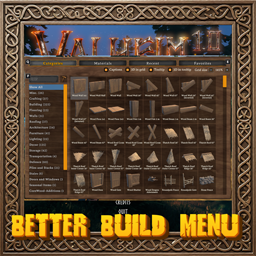
Move and resize the build menu, multi-word search, 3d preview, and a pooled piece grid with no lag.🔨 Better Build Menu
Move and resize the build menu, see every piece's name and a 3D picture of it, get its cost and description beside the cursor, search with more than one word, and open the menu without lag however many pieces you have.
💶 Donations:
If you enjoy using this Valheim mod, please consider making a small donation to help support its development and future updates.
Even £1 or $1 would be greatly appreciated and would help more than you might think!
Thank you for your support, and happy gaming! ⚔️ ...... (A Paypal account is NOT required!)

🔥 Features:
- No lag: the piece grid only makes buttons for the rows you can see and reuses them as you scroll, so opening the menu, changing tabs and searching stay quick even with a lot of modded pieces.
- Move: drag the build menu by any empty space on it.
- Resize: move the mouse over the lower-right corner of the build menu and drag the button that shows there. The grid fills the new size.
- Captions: each piece's name is shown under its icon, so you can find a piece without pointing at every one.
- 3D pictures: the grid shows a 3D picture of each piece in place of its icon. They are made a few at a time as pieces come into view, so the menu never stalls. Pieces with nothing to show in 3D, such as the hoe's ground tools, keep their icons.
- Tooltip at the cursor: point at a piece to see its name, a turning 3D model, how many of each material you carry against how many it needs, the crafting station it needs (in red when none is near), and its description. With a controller it shows beside the selected piece.
- Grid size: make the cells bigger with the - and + buttons at the top of the build menu, from 100% to 200% of the game's size.
- Quick options: tick boxes at the top of the build menu turn the captions, 3D pictures, tooltip and its 3D model on and off.
- No-cost play (the world setting or the
nocostcommand) shows everything as buildable. - Better search: each word you type is looked for in the piece's name and its materials, in any order, so
stone wallorwood ironfind what you expect. Switch back to the game's search in the settings. - The position and size are saved, and come back the next time you play.
⚙️ Configuration:
- Enable Plugin turns the mod on or off. This is a local setting and needs a game restart.
- Panel: turn moving and resizing on or off, and set the position and size by hand. The build menu starts taller than the game's (Panel Extra Height 260). Set them to 0 for the game's position and size.
- Grid: Show Captions (on), 3D In Grid (on) and Grid Size (145%).
- Tooltip: Tooltip At Cursor (on) and 3D In Tooltip (on).
- Search Mode:
Advanced(multi-word) orVanilla(the game's search). - Change them in game (with the tick boxes and buttons at the top of the build menu, Configuration Manager or the mod settings menu, F7) or in the config file
MagicMike.BetterBuildMenu.cfg. Changes show straight away.
🌐 Multiplayer:
- Client side only. You can join any server with it, and other players do not need it.
📦 Requirements:
⚠️ Incompatibilities:
- Not for use with any plugin that takes over the build menu.
💻 Installation:
Automatic Install
- Plugin is created to be installed with r2modman or Gale. For Nexus downloads you will need to install manually.
Manual Install
- Un-zip and drag the
pluginsfolder into yourBepInExfolder.
💥 Plugins Created by Magic Mike:
- Corewood Extras
- Corewood Fortified
- Corewood Additions
- My Dirty Hoe
- Chest Preview
- YabbaDabbaDoo
- BetterBuildMenu
- BetterCraftMenu