

Magic Supremacy
Experience magic like never before - deeper, greater and more diverse
📘 Mods Guide & Crafting Overview
Crafting recipes, internal prefab names and additional developer notes:
| 🢂 Full Mods Guide - Google Sheets 🢀 |
|---|
Magic Supremacy
Magic Supremacy adds a new collection of magical armor sets and powerful magic weapons, beginning in the Black Forest and expanding across every biome of Valheim.


🧩 Full Set System
Full set bonuses require all 4 armor pieces — Head, Chest, Legs, and Cape.
Completing a full set grants access to a unique mechanic available only while wearing that specific set, giving each armor line its own distinct identity and playstyle.
This makes every full set feel like a complete magical path rather than just a collection of individual bonuses.
⚙️ Hybrid Builds
For players who choose not to wear a full set, armor pieces from different biomes use different stat placement and, in some cases, different stat types, allowing more flexible build combinations.
Capes also continue to carry unique bonuses, adding even more room for custom builds and personal playstyles.
This makes it possible to focus on specific stats and create specialized setups by combining pieces from different armor lines.
🔨 Crafting Station
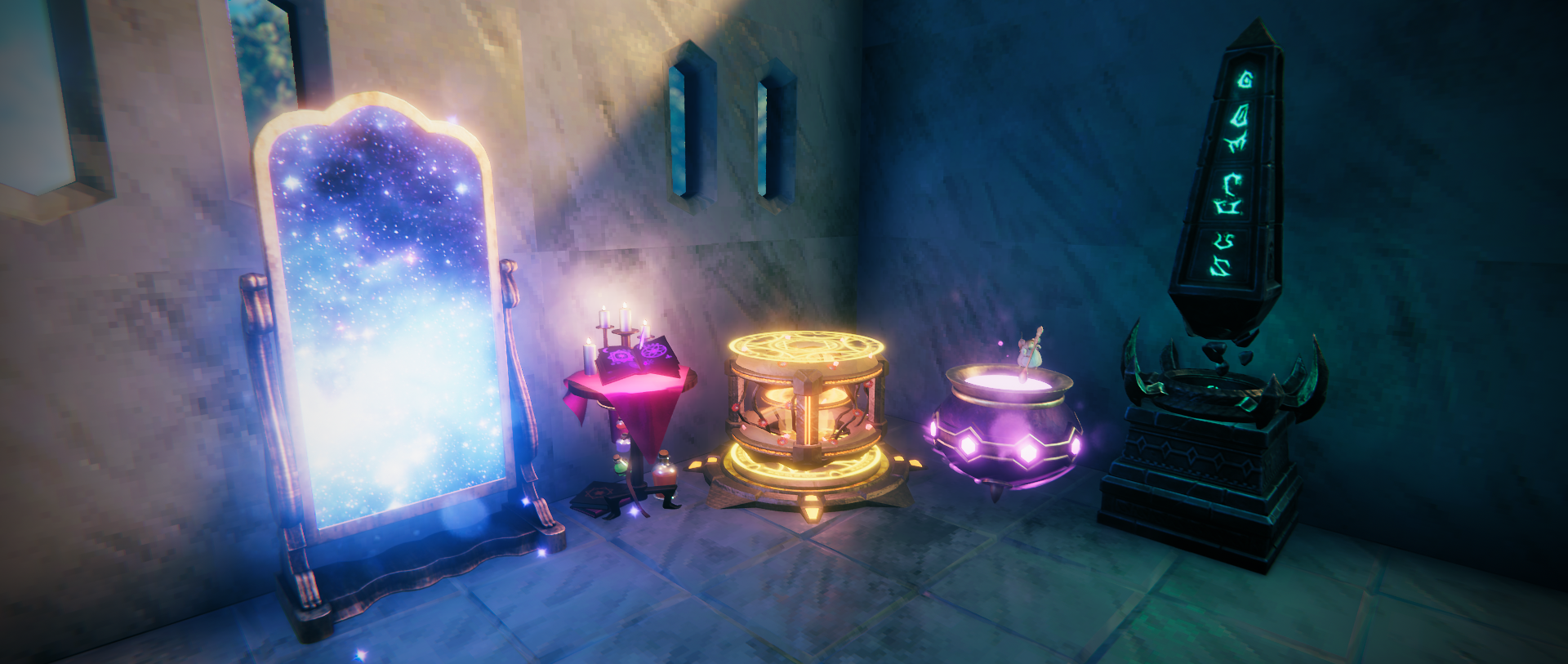
A dedicated crafting station, the Magic Weaver, enhanced by powerful elemental extensions, is used to craft all new magical equipment.
Alongside it stands the Essence Cauldron, where magical meals and potent elixirs are prepared.
🧿 Spirits & Magical Materials
All magical equipment is crafted using rare magical materials and Spirits - elemental orbs infused with magical essence.
Each armor set is bound to its own Spirit, which drops from enemies within its respective biome.
Stronger creatures have a higher chance to drop Spirits.
List of Spirits
- Spirit of Totem — Totemcaller
- Spirit of Mushroom — Mushroomcaller
- Spirit of Death — Deathcaller
- Spirit of Frost — Frostcaller
- Spirit of Fire — Firecaller
- Spirit of Stone — Stonecaller
- Spirit of Wind — Windcaller
- Spirit of Light — Lightcaller
- Spirit of Storm — Stormcaller
- Spirit of Blood — Bloodcaller
List of Materials
- Dim Eitr — a core resource used for magical crafting
- Eitr-Fractured Remnant — a raw form of Dim Eitr that must be refined into usable Dim Eitr
- Roseheart Crystal — drops from Eikthyr and is required to build the Magic Weaver
- Arcane Page — drops from creatures or can be bought from Haldor, used to craft magical Tomes
- Mouse's Spoon — drops from Trolls and is required to build the Essence Cauldron
🦝 Encounter
Meet Riko — your fluffy little helper.
From time to time, during your long journeys, Riko may suddenly appear by your side to leave a small gift and brighten your path.

He can be encountered in all biomes, starting from the Black Forest, often appearing where you least expect him. Once the gifts are in your hands, Riko quickly disappears — perhaps to return again someday with new surprises.
✨ Inspiration System
A new system called Inspiration adds a special resource in the form of Inspiration Points, used to cast powerful spells and abilities.
Inspiration builds slowly over time, allowing players to prepare for stronger magical spells.
Access to the Inspiration system is provided through magical Tomes — a separate equipment slot that does not replace your main gear. While equipped, Tomes enable Inspiration and can increase its generation rate or expand the maximum number of Inspiration Points available, alongside bonuses from certain armor sets and accessories.
📘 Inspiration System — Quick Guide (Click to expand)
What is Inspiration?
Inspiration is a special resource in the form of Inspiration Points.
Inspiration Points are used to cast powerful spells and abilities.
How do I activate it?
Inspiration is activated by equipping a magical Tome.
Tomes use a separate equipment slot and can be equipped alongside items such as Megingjord.
How does Inspiration generate?
Inspiration Points generate over time: you gain 1 point every 120 seconds.
Once you reach maximum capacity, Inspiration Points stop generating until you spend them.
How much Inspiration can I store?
Your maximum Inspiration capacity is the number of points you can store at once.
When Inspiration is activated, your maximum capacity starts at 1 point.
The system allows you to increase this maximum up to 8 points with the right gear.
How can I improve Inspiration?
Magical Tomes provide different bonuses to generation speed and maximum capacity.
Additional bonuses can come from certain full armor sets and utility items.
How do different Tomes affect gameplay?
Some Tomes focus more on increasing your maximum Inspiration capacity, allowing you to store a reserve before combat or use high-cost abilities.
Others focus more on regeneration speed, letting you rely on smaller, more frequent abilities during combat.
You either prepare with a larger pool or rely on faster recovery for constant use.
Are Tomes from later biomes stronger?
A Tome’s effectiveness does not depend on the biome where you obtain it. A Tome from an earlier biome can be more effective than one from a later biome, depending on your build and playstyle.
Most Tomes are designed to offer different playstyles rather than direct upgrades. The only exception is the Mushroom Tome, which serves as an introductory option to the system.
This system creates smoother balance for magic progression, making powerful abilities feel more valuable and encouraging better timing and stronger decision-making in combat.
🔧 Configuration
The Inspiration System includes 3 main configuration sections, with additional sections automatically added for supported external mod integrations.
General
Controls the overall behavior of the Inspiration System.
UI
Adjusts how Inspiration is visually displayed, including progress indicators.
Customizations
Allows you to customize Inspiration sources from items and status effects, as well as Inspiration costs for weapons.
+
External Mods Customizations
Allows you to customize Inspiration sources and Inspiration costs provided by external mod integration configs.
⚙️ Inspiration System - External Mod Integration
Magic Supremacy supports external Inspiration integration for other mods through .cfg definition files.
📘 External Integration — Quick Guide (Click to expand)
To integrate with the Inspiration System, simply place one .cfg file inside the Definitions folder.
Folder Structure
Place your file here:
BepInEx/config/DistantOrigins/Inspiration/Definitions/
Example:
BepInEx/config/DistantOrigins/Inspiration/Definitions/YourMod.Inspiration.cfg
File naming format:
YourModName.Inspiration.cfg
On launch, Magic Supremacy automatically generates an editable config here:
BepInEx/config/DistantOrigins/Inspiration/Configs/YourMod.Inspiration.cfg
The original definition file stores the default values used for generated configs.
Sources Format
DisplayName|SourceType|SourceName|ActivatesInspiration|GainPercent|MaxBonus
Arguments
DisplayName — the visible name used in the generated config. You can use any text here.
SourceType — the type of source. Use StatusEffect or ItemStat.
StatusEffect— Inspiration comes from a status effect or set bonus.ItemStat— Inspiration comes directly from an equipped item.
SourceName — the internal prefab name of the status effect or item.
ActivatesInspiration — controls whether this source activates Inspiration. Use true or false.
true— this source activates Inspiration.false— this source only gives bonuses while Inspiration is already active.
GainPercent — bonus Inspiration gain speed in percent.
MaxBonus — additional maximum Inspiration Points.
Example
Super Magic Cape|StatusEffect|SE_MagicCapeSuperFly|true|50|1
Result
Super Magic Cape — the entry will appear in the config as Super Magic Cape.
StatusEffect — the system will look for a status effect.
SE_MagicCapeSuperFly — this is the internal name of the status effect.
true — this source activates Inspiration.
50 — this source gives +50% Inspiration gain speed.
1 — this source gives +1 maximum Inspiration Point.
Consumers Format
DisplayName|PrefabName|PrimaryCost|SecondaryCost
Arguments
DisplayName — the visible name used in the generated config. You can use any text here.
PrefabName — the internal prefab name of the weapon.
PrimaryCost — Inspiration cost for the primary attack.
SecondaryCost — Inspiration cost for the secondary attack.
Use 0 if an attack should not consume Inspiration.
Example
Super Magic Staff|StaffMagicSuper|0|2
Result
Super Magic Staff — the entry will appear in the config as Super Magic Staff.
StaffMagicSuper — this is the internal prefab name of the weapon.
0 — the primary attack does not consume Inspiration.
2 — the secondary attack consumes 2 Inspiration Points.
Notes
- Lines starting with
#are ignored. - Empty lines are allowed.
- Invalid prefabs or status effects are ignored safely.
- Duplicate entries are skipped automatically.
- Magic Supremacy internal entries always take priority over external entries.
- Generated configs are automatically synchronized through ServerSync when configuration locking is enabled.
- Do not use
|inside names.
Basic Template
Your final file may look like this:
[Sources]

Super Magic Cape|StatusEffect|SE_MagicCapeSuperFly|true|50|1
Super Magic Helmet|ItemStat|ArmorMagicHelmet|false|20|3


[Consumers]

Super Magic Staff|StaffMagicSuper|0|2
Super Blood Staff|StaffBloodSuper|1|0
Config Manager Integration
After successfully adding your custom Inspiration config, a separate category will automatically appear inside the Magic Supremacy settings when using Config Manager.
Format:
Inspiration - YourModName
This allows mod authors to add custom Inspiration sources to items and armor sets, and Inspiration costs to weapons without modifying Magic Supremacy itself.
🌍 Translations
| Available Languages |
|---|
| 🇪🇸 Spanish |
| 🇫🇷 French |
| 🇩🇪 German |
| 🇨🇿 Czech |
| 🇵🇱 Polish |
| 🇺🇦 Ukrainian |
| 🇷🇺 Russian |
| 🇹🇷 Turkish |
| 🇨🇳 Chinese |
| 🇰🇷 Korean |
| 🇯🇵 Japanese |
| 🇧🇷 Portuguese (Brazil) |
🔧 Compatibility
✔️ Supported Mods
| Mod | Integration |
|---|---|
| AzuExtendedPlayerInventory | Adds a custom equipment slot |
| ShaderHelperForMac | Fixes shader rendering issues on Mac |
❌ Not Recommended
| Mod | Reason |
|---|---|
| MagicPlugin | Breaks visual effects |
| Drop That | Breaks enemy item drops |
🙏 Credit & Thanks
Special thanks to:
- Insanity — for his dedicated testing throughout all stages, and for his invaluable ideas and feedback during development
- Distant Origins community — for being part of this journey and supporting the project
and
- Azumatt — for his tutorial material
- MidnightsFX, Hugo The Dwarf — for their help and guidance
💬 Mod Support & Feedback
Please feel free to share any feedback or suggestions on my Discord:
👉 Join the Distant Origins Discord
⚠️ Usage & Monetization
Asset & Code Usage
You are welcome to use this mod in modpacks and create compatibility patches to resolve unintended conflicts with other mods, as well as custom configuration, balance, or localization patches, provided that the original mod remains a required dependency.
Extracting, copying, modifying, or redistributing this mod or any of its resources is not permitted.
Code, assets, prefabs, or other resources from this mod may not be incorporated into another mod, DLL, or project.
Monetization
This mod is free and was created for the enjoyment of the community.
Please do not use this mod or its content in monetized contexts.
This includes:
- Selling access to features or content from the mod
- Offering them as rewards for donations or paid services
💬 I’m always open to discussion and collaboration — thank you for respecting the time and effort behind this work.
☕ Donations & Tips
I'm a 34-year-old teacher who creates mods in my free time simply because I enjoy it and love bringing new experiences to Valheim. Everything I make is a passion project. If you ever feel like leaving a little something, you can support me here ❤️

