
Faster Loading
Load big cities in about a third of the time: an 8x8 city went from 3:38 to 1:16. New cities generate faster, saves load faster, and the city settles sooner. Same city, far less waiting.
A BepInEx (mod loader) plugin for Shadows of Doubt. Spend your evening on the case, not on the loading screen.
An 8x8 city went from 3:38 to 1:16. New cities generate faster, saves load faster, and the city settles sooner once you arrive. The city you end up in is the same one.
Part of the Quality of Life and Complete modpacks.
If it saves you some waiting, please leave a like on its Thunderstore page. It keeps me motivated to make more mods. Donations are welcome too:


What you get
- Big cities load in about a third of the time from the second load of a city.
- A faster first load too: about 40% off on that same 8x8 city, before anything has been remembered.
- Saves load about 40% faster.
- New cities generate faster: about 30% on an 8x8 city, which saves minutes.
- New in 1.1: the city settles sooner after you arrive. Smooth play starts about 35 seconds earlier on an 8x8 city, and the longest freeze right after arriving dropped from 27 to 20 seconds.
- The bigger the city, the more you save. Big cities are where the game gets slow, and that is where this mod does the most.
- Nothing to set up. Install it and load a city.
- Nothing in your saves. It only stores a small helper file per city, and you can remove the mod at any time.
The numbers
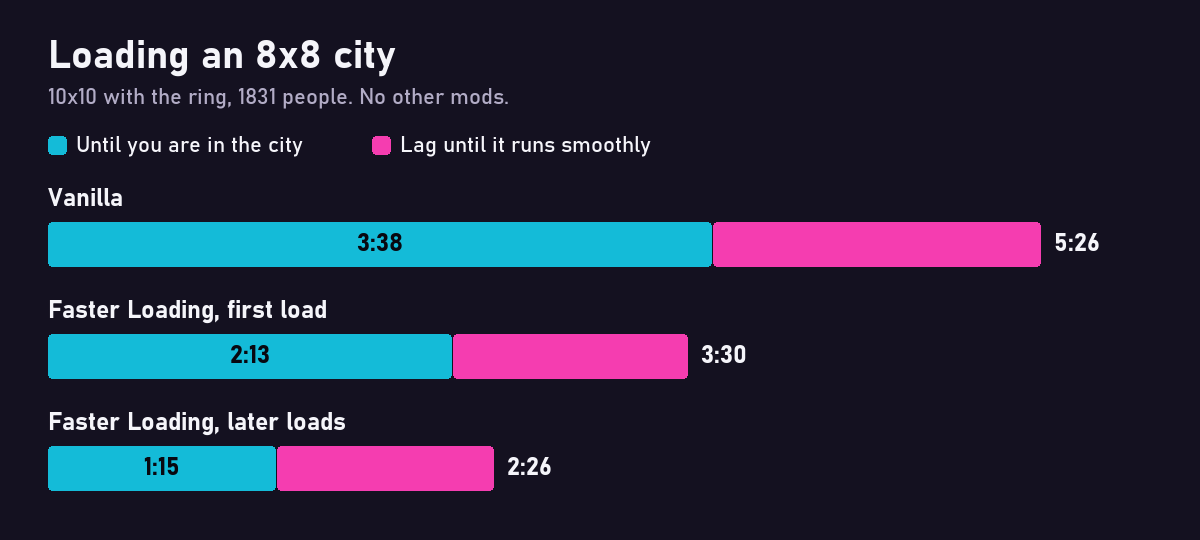
Vanilla game against this mod, with no other mods running:
| 8x8 city (10x10 with the ring, 1831 people) | Vanilla | Faster Loading | Saved |
|---|---|---|---|
| Load a city, first time | 3:38 | 2:13 | 39% |
| Load a city, later times | 3:38 | 1:15 | 66% |
| Generate a new city | 8:45 | 6:11 | 29% |
| 5x5 city (7x7 with the ring, 709 people) | Vanilla | Faster Loading | Saved |
|---|---|---|---|
| Load a save | 1:01 | 0:35 | 42% |
More sizes, loading a city from the second time on. These two were measured with extra content mods in the game, which changed the 8x8 times by 14 seconds or less:
| City | Without | Faster Loading | Saved |
|---|---|---|---|
| 5x5 (7x7 with the ring) | 0:59 | 0:33 | 44% |
| 10x10 (12x12 with the ring) | 7:06 | 1:52 | 74% |
A very large city generated with the game's own menu, with no other mods running:
| Very large 5x4 (7x6 with the ring, 621 people) | Vanilla | Faster Loading | Saved |
|---|---|---|---|
| Generate a new city, until you are in it | 2:29 | 2:11 | 12% |
| Generate a new city, until it runs smoothly | 2:42 | 2:21 | 13% |
Times run from the start of the load until you are in the city, on one PC with 16 GB of memory. Yours will differ, but the proportions should be similar. Very small cities already load in seconds, so there is less to win on those.
What to expect
Generating a new city gains the least, especially at the sizes the game offers without a size mod. The bigger gain comes when you load that city again: the first load builds a small helper file, and every load after that uses it. To see it for yourself, load the new city twice and compare the second load with the same load without the mod.
How it works
The game works out the same things from scratch on every load. This mod lets it skip that repeated work:
- Remembers room visibility: the first load of a city keeps what the game worked out about which rooms can see what, and later loads read it back in a moment.
- Finds facts faster: the game searches a long list for every new fact. An index gives the same answer right away.
- Skips pointless breaker searches: no more searching every object in the city for a breaker that does not exist yet.
- Answers repeat checks from memory: right after you arrive, the game repeats the same checks millions of times with the same answer. The mod answers the repeats from memory and clears that memory after every pass.
- Helps Density Mod: if you use it, its search over the city's tiles runs only while a new city is being generated.
I compared the results with the game's own on several cities: every room, camera and fact check came out the same, so the city plays as it always did.
Good to know
- After you arrive: the game stays busy for a while once you are in the city, which can stutter on big cities. Since 1.1 this mod shortens that too: on 8x8 the time until the city runs smoothly went from 5:26 to 2:26 (3:01 with 1.0).
- Helper files: a few MB per city at most, in
BepInEx/cache/sm3gm.loadfix. You can delete them at any time. The next load just builds them again. - After changing mods: adding, removing or updating a BepInEx mod makes the next load of each city build its helper file again, so that one load counts as a first load.
- Pairs well with: Skip Intro, which skips the logos and the press-any-key screen.
Config
You do not need to change anything. After one launch, edit BepInEx/config/sm3gm.sod.loadfix.cfg with the game closed.
| Setting | Default | Meaning |
|---|---|---|
| Fixes / RememberRoomData | true | Remember room visibility and reuse it on later loads of the same city. |
| Fixes / FastFactLookup | true | Find existing facts with an index. |
| Fixes / FastBreakerSearch | true | Skip searching for breakers that do not exist yet. |
| Fixes / RememberRepeatChecks | true | Right after you arrive, answer repeated checks from memory, so the city settles sooner. |
| Fixes / DensityModOnlyWhenNeeded | true | Run Density Mod's search only while a new city is being generated. |
| Debug / CheckRoomData | false | Write comparison data after each load. Adds about 5 seconds, so leave it off. |
Install
Use Thunderstore Mod Manager or r2modman and install as normal. BepInEx is installed automatically.
To install by hand:
- Install BepInExPack IL2CPP version 6.0.755.
- Put
SoDLoadFix.dllinBepInEx/plugins/FasterLoading/inside your existingBepInExfolder.
Feedback
Found a bug or have an idea? Post it on the official Shadows of Doubt Discord: https://discord.gg/shadows
Also by sm3gm
All my mods are on Thunderstore.
Support
This mod is free and always will be.
Likes are greatly appreciated and keep me motivated to release more mods, so if you enjoy it, please leave one. You give a like on the mod's Thunderstore page while logged in to Thunderstore. If you installed through a mod manager, open that page in your browser to find the button.
And if you love what I do and want to support future projects, or just want to send a friendly thought, you can do so here:
Thanks for playing.